Wie aktualisiert man die i5xW Innenstation im POST-Modus?

Einführung1.

1.1. Übersicht

 Die Innenstationen der i5xW-Serie benötigen möglicherweise Firmware-Updates, um spezifische Anforderungen zu erfüllen oder bestimmte Fehler zu beheben. Im Folgenden wird beschrieben, wie Sie die Innenstationen der i5xW-Serie im POST-Modus aktualisieren.

1.2. Anwendbare Modelle

 Innenstationen der i5xW-Serie: i51W, i52W, i53W.

1.3. Voraussetzungen

① Eine Innenstation der i5xW-Serie (hier am Beispiel des i52W), ein PoE-Switch (oder ein Gleichstromnetzteil). Verbinden Sie das Gerät mit dem Switch.
   ② Ein Computer zur Fehlerbehebung; verbinden Sie den Computer mit demselben Switch und stellen Sie sicher, dass die Netzwerkverbindung zwischen Computer und Gerät erreichbar ist.

1.4. Anschlussplan für Gerät und Computer

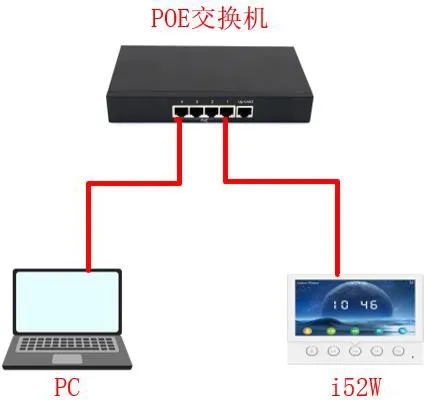
① Verbinden Sie das i52W mit dem Switch und den Computer mit demselben Switch. Stellen Sie sicher, dass die Netzwerkverbindung zwischen Computer und Switch erreichbar ist. Der Anschlussplan ist in Abbildung 1 dargestellt.
Anschlussplan für Gerät und Computer
            Abbildung 1 Anschlussplan für Gerät und Computer
Aktualisieren der i5xW Innenstation im POST-Modus2.

Um im POST-Modus zu aktualisieren, muss das i5xW zunächst in den POST-Modus wechseln. Anschließend greift ein Computer auf die POST-Weboberfläche des Geräts zu, um das Update durchzuführen. Am Beispiel des i52W wird im Folgenden das POST-Modus-Update für das i5xW beschrieben.

2.1. In den POST-Modus wechseln

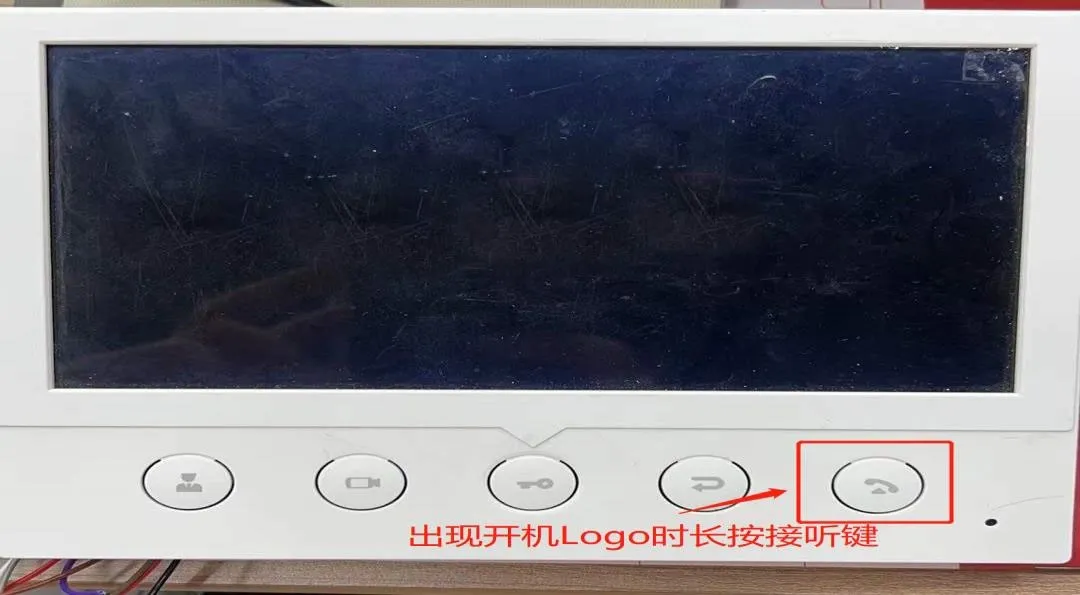
(1) Nach dem Einschalten des i52W, wenn das Startlogo erscheint, halten Sie die Antwort-Taste lange gedrückt, wie in Abbildung 2 gezeigt.
So wechseln Sie am i52W in den POST-Modus
                                                                                                           Abbildung 2 So wechseln Sie am i52W in den POST-Modus
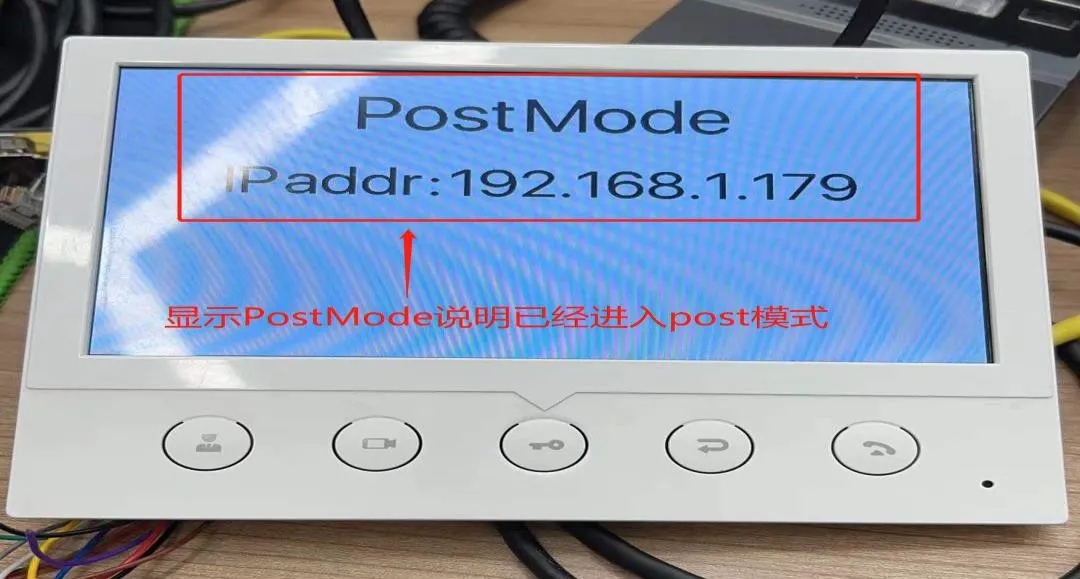
   (2) Wenn die PostMode-Oberfläche erscheint, hat das i52W erfolgreich in den POST-Modus gewechselt, wie in Abbildung 3 dargestellt.
i52W erfolgreich in den POST-Modus gewechselt
                                                                                                      Abbildung 3 i52W erfolgreich in den POST-Modus gewechselt

 2.2. Aktualisieren der Firmware im POST-Modus

Nachdem das Gerät in den POST-Modus gewechselt ist, ist eine Konfiguration über die POST-Weboberfläche erforderlich. Die detaillierten Schritte sind wie folgt.
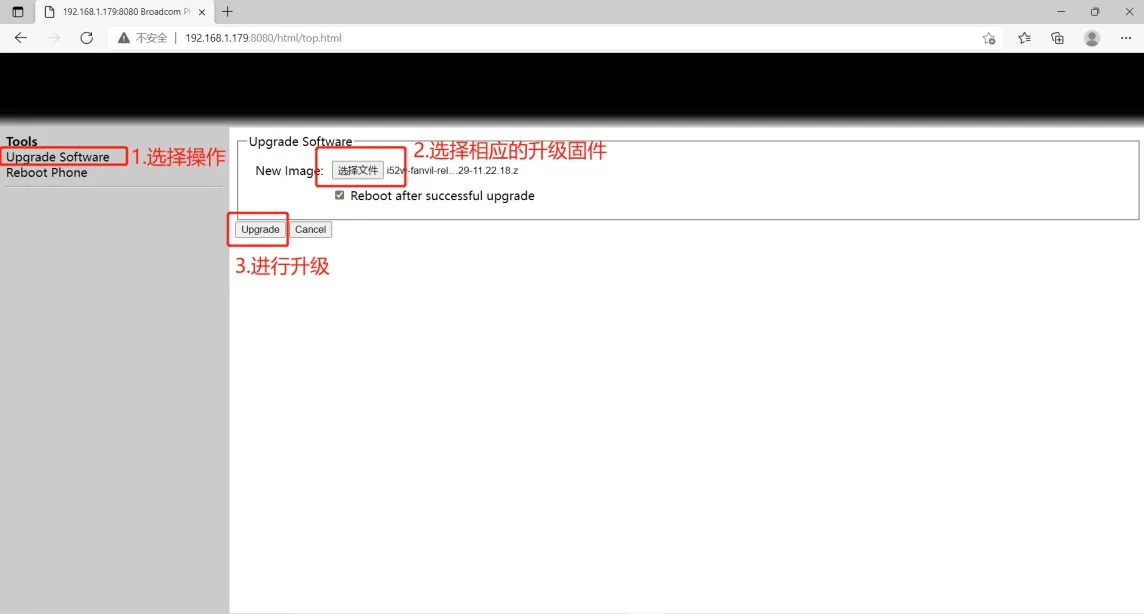
(1) Rufen Sie die POST-Weboberfläche auf: Geben Sie http://192.168.1.179:8080 in den Browser ein, um die POST-Weboberfläche zu öffnen.
(2) Führen Sie das Update durch: Wählen Sie in der POST-Weboberfläche "Upgrade Software", dann die entsprechende Firmware-Datei und klicken Sie auf "Upgrade", um das Update zu starten, wie in Abbildung 4 gezeigt.
Konfiguration der POST-Weboberfläche 
                                                                                                             Abbildung 4 Konfiguration der POST-Weboberfläche
(3) Warten Sie, bis das Update abgeschlossen ist; das Gerät startet automatisch neu.
(4) Überprüfen Sie, ob die Firmware-Version auf die Zielversion aktualisiert wurde. Falls nicht, können Sie das Update erneut durchführen; falls ja, war das Update erfolgreich.
Das oben Beschriebene erläutert den POST-Aktualisierungsprozess für die Innenstationen der i5xW-Serie.

Katalog
Kundenservice Telefon
We use cookie to improve your online experience. By continuing to browse this website, you agree to our use of cookie.

Cookies

This Cookie Policy explains how we use cookies and similar technologies when you access or use our website and related services. Please read this Policy together with our Terms and Conditions and Privacy Policy so that you understand how we collect, use, and protect information.

By continuing to access or use our Services, you acknowledge that cookies and similar technologies may be used as described in this Policy, subject to applicable law and your available choices.

Updates to This Cookie Policy

We may revise this Cookie Policy from time to time to reflect changes in legal requirements, technology, or our business practices. When we make updates, the revised version will be posted on this page and will become effective from the date of publication unless otherwise required by law.

Where required, we will provide additional notice or request your consent before applying material changes that affect your rights or choices.

What Are Cookies?

Cookies are small text files placed on your device when you visit a website or interact with certain online content. They help websites recognize your browser or device, remember your preferences, support essential functionality, and improve the overall user experience.

In this Cookie Policy, the term “cookies” also includes similar technologies such as pixels, tags, web beacons, and other tracking tools that perform comparable functions.

Why We Use Cookies

We use cookies to help our website function properly, remember user preferences, enhance website performance, understand how visitors interact with our pages, and support security, analytics, and marketing activities where permitted by law.

We use cookies to keep our website functional, secure, efficient, and more relevant to your browsing experience.

Categories of Cookies We Use

Strictly Necessary Cookies

These cookies are essential for the operation of the website and cannot be disabled in our systems where they are required to provide the service you request. They are typically set in response to actions such as setting privacy preferences, signing in, or submitting forms.

Without these cookies, certain parts of the website may not function correctly.

Functional Cookies

Functional cookies enable enhanced features and personalization, such as remembering your preferences, language settings, or previously selected options. These cookies may be set by us or by third-party providers whose services are integrated into our website.

If you disable these cookies, some services or features may not work as intended.

Performance and Analytics Cookies

These cookies help us understand how visitors use our website by collecting information such as traffic sources, page visits, navigation behavior, and general interaction patterns. In many cases, this information is aggregated and does not directly identify individual users.

We use this information to improve website performance, usability, and content relevance.

Targeting and Advertising Cookies

These cookies may be placed by our advertising or marketing partners to help deliver more relevant ads and measure the effectiveness of campaigns. They may use information about your browsing activity across different websites and services to build a profile of your interests.

These cookies generally do not store directly identifying personal information, but they may identify your browser or device.

First-Party and Third-Party Cookies

Some cookies are set directly by our website and are referred to as first-party cookies. Other cookies are set by third-party services, such as analytics providers, embedded content providers, or advertising partners, and are referred to as third-party cookies.

Third-party providers may use their own cookies in accordance with their own privacy and cookie policies.

Information Collected Through Cookies

Depending on the type of cookie used, the information collected may include browser type, device type, IP address, referring website, pages viewed, time spent on pages, clickstream behavior, and general usage patterns.

This information helps us maintain the website, improve performance, enhance security, and provide a better user experience.

Your Cookie Choices

You can control or disable cookies through your browser settings and, where available, through our cookie consent or preference management tools. Depending on your location, you may also have the right to accept or reject certain categories of cookies, especially those used for analytics, personalization, or advertising purposes.

Please note that blocking or deleting certain cookies may affect the availability, functionality, or performance of some parts of the website.

Restricting cookies may limit certain features and reduce the quality of your experience on the website.

Cookies in Mobile Applications

Where our mobile applications use cookie-like technologies, they are generally limited to those required for core functionality, security, and service delivery. Disabling these essential technologies may affect the normal operation of the application.

We do not use essential mobile application cookies to store unnecessary personal information.

How to Manage Cookies

Most web browsers allow you to manage cookies through browser settings. You can usually choose to block, delete, or receive alerts before cookies are stored. Because browser controls vary, please refer to your browser provider’s support documentation for details on how to manage cookie settings.

Contact Us

If you have any questions about this Cookie Policy or our use of cookies and similar technologies, please contact us at support@becke.cc .