
Der Farbbildschirm SIP Phone Image Upgrade Guide enthält benutzerdefinierte Hintergrundbilder, Logos, DSS-Tastensymbole, Photoshop-Erstellung, 7-Zip-Verpackung, Web-UI und Auto Provision Upgrade-Schritte für alle Modelle
Farbige IP-Telefone unterstützen benutzerdefinierte Upgrades für Hintergrundbilder im Leerlauf und Titellogos. Telefone der H5-Serie unterstützen zusätzlich benutzerdefinierte Upgrades für Symbole von Kurzwahltasten. Es stehen zwei Upgrade-Methoden zur Verfügung: Upgrade über die Weboberfläche und Upgrade über Auto Provision. Unterstützte Bildformate: .bmp und .tar.gz.
1. Hintergrundbildspezifikationen für verschiedene Modelle von Farbbildschirmtelefonen:
Tabelle 1 - Hintergrundbildspezifikationen für die Farbbildschirmserie
| Modell | Auflösung B*H | Farbtiefe | Format | Dateigröße | Dateiname | |
| BX3S/BX4 | 320*240 | 16bit RGB565 | bmp | ~150KB | Unbegrenzt | |
| BX3SG | 320*240 | 16bit RGB565 | bmp | ~150KB | Unbegrenzt | |
| BX3U | 320*240 | 16bit RGB565 | bmp | ~150KB | Unbegrenzt | |
| BX4U | 320*240 | 16bit RGB565 | bmp | ~150KB | Unbegrenzt | |
| BH5 | 480*320 | 16bit RGB565 | bmp | ~300KB | Unbegrenzt | |
| BX5S | 480*320 | 16bit /24bit RGB565 | bmp | |||
| ~300KB | Unbegrenzt | |||||
| BX5U | 480*320 | 16bit RGB565 | bmp | ~300KB | Unbegrenzt | |
| BX6-Haupt | 480*272 | 24bit RGB888 | bmp | ~380KB | Unbegrenzt | |
| BX6-Neben | 240*320 | 16bit RGB565 | bmp | ~150KB | Unbegrenzt | |
| BX6U | 480 * 272 | 24bit RGB888 | bmp | ~380KB | Unbegrenzt | |
| BX7 | 800*480 | 24bit RGB888 | bmp | ~1.00MB | Unbegrenzt | |
| BX7C | 800*480 | 24bit RGB888 | bmp | ~1.00MB | Unbegrenzt | |
| GP210/GP210i-Haupt | 480*272 | 24bit RGB888 | bmp | ~380KB | Unbegrenzt | |
| GP210/GP210i-Neben | 320*480 | 16bit RGB565 | bmp | ~300KB | Unbegrenzt |
2. DSS-Tasten-Symbolspezifikationen für verschiedene Modelle von Farbbildschirmtelefonen:
Tabelle 2 - DSS-Tasten-Symbolspezifikationen für Farbbildschirmmodelle
| Modell | Auflösung B*H | Farbtiefe | Format | Dateigröße | Dateiname |
| BX3S/BX4 | - | - | - | - | - |
| BH5 | 54*54 | 16bit RGB565 | bmp | ~5KB | Siehe Tabelle 3 |
| BX4U-Seite | 25*25 | 32bit | Png | ~3KB | Siehe Tabelle 4 Normale DSS-Taste |
| BX4U-Neben | 42*42 | 32bit | Png | ~3KB | Siehe Tabelle 4 Normale DSS-Taste |
| BX5U-Seite | 25*25 | 32bit | Png | ~3KB | Siehe Tabelle 4 Normale DSS-Taste |
| BX5U-Neben | 42*42 | 32bit | Png | ~3KB | Siehe Tabelle 4 Normale DSS-Taste |
| BX6U-Seite | 25*25 | 32bit | Png | ~3KB | Siehe Tabelle 4 Normale DSS-Taste |
| BX6U-Neben | 42*42 | 32bit | Png | ~3KB | Siehe Tabelle 4 Normale DSS-Taste |
| BX5S | - | - | - | - | - |
| BX6-Neben DSS | 42*42 | 32bit | Png | ~3KB | Siehe Tabelle 4 Normale DSS-Taste |
| BX7 | - | - | - | - | - |
| BX7C | 31*31 | 32bit | Png | ~4KB | Siehe Tabelle 4 Seitliche DSS-Taste |
| GP210/GP210i-Seite | 25*25 | 32bit | Png | ~2KB | Siehe Tabelle 4 Seitliche DSS-Taste |
| GP210/GP210i-Neben DSS | 42*42 | 32bit | Png | ~3KB | Siehe Tabelle 4 Normale DSS-Taste |
3. Benennung von Kurzwahlsymbolen auf dem Leerlaufbildschirm für BH5-Telefone:
Tabelle 3 - Benennung benutzerdefinierter Symbole für H5-Telefone
| Dateityp | Dateiname | Format | Dateigröße | Auflösung BxH |
| Empfang | ICON_RECEPTION | bmp | ~5KB | 54x54 |
| Service | ICON_SERVICE | bmp | ~5KB | 54x54 |
| Reinigung | ICON_CLEANING | bmp | ~5KB | 54x54 |
| Wecken | ICON_WAKEUP | bmp | ~5KB | 54x54 |
| Notfall | ICON_EMG | bmp | ~5KB | |
| 54x54 | ||||
| Manager | ICON_MANAGER | bmp | ~5KB | 54x54 |
Hinweis: Die Hintergrundfarbe der Bilder von Kurzwahltasten muss schwarz sein, um den Hintergrund zu entfernen und kreisförmige Symbole auf dem LCD-Bildschirm anzuzeigen.
4. Benennung von DSS-Tastensymbolen auf dem Leerlaufbildschirm für Farbbildschirmtelefone:
Tabelle 4 - Symbole für DSS- und seitliche DSS-Tasten
| DSS-Tastentyp | ||
| Symbolname der seitlichen DSS-Taste | Symbolname der normalen DSS-Taste | |
| BLF-Liste | side_custom_dss_blflist.png | custom_dss_blflist.png |
| DTMF | side_custom_dss_dtmf.png | custom_dss_dtmf.png |
| Keine | side_custom_dss_edit.png | custom_dss_edit.png |
| Tastenereignis | side_custom_dss_keyevent.png | custom_dss_keyevent.png |
| Leitung | side_custom_dss_line.png | custom_dss_line.png |
| URL & Aktions-URL | side_custom_dss_url.png | custom_dss_url.png |
| Mcast | side_custom_dss_mcast.png | custom_dss_mcast.png |
| Speichertaste/Überwachte Weiterleitung | side_custom_dss_mem_axfer.png | custom_dss_mem_axfer.png |
| Speichertaktaste/Blinde Weiterleitung | side_custom_dss_mem_bxfer.png | custom_dss_mem_bxfer.png |
| Speichertaste/Anrufparken | side_custom_dss_mem_callpark.png | custom_dss_mem_callpark.png |
| Speichertaste/Anrufweiterleitung | side_custom_dss_mem_cfw.png | custom_dss_mem_cfw.png |
| Speichertaste/Konferenz | side_custom_dss_mem_conf.png | custom_dss_mem_conf.png |
| Speichertaste/DTMF | side_custom_dss_mem_dtmf.png | custom_dss_mem_dtmf.png |
| Speichertaste/Gegensprechanlage | side_custom_dss_mem_intercome.png | custom_dss_mem_intercome.png |
| Speichertaste/MWI | side_custom_dss_mem_mwi.png | custom_dss_mem_mwi.png |
| Speichertaste/Neuer Anruf | side_custom_dss_mem_newcall.png | custom_dss_mem_newcall.png |
| Speichertaste/Anwesend | side_custom_dss_mem_present.png | custom_dss_mem_present.png |
| Speichertaste/Kurzwahl | side_custom_dss_mem_spdial.png | custom_dss_mem_spdial.png |
Spezifikationen des Titellogos für Farbbildschirmtelefone:
Hinweis: Die Serien BX5S und BX6 unterstützen vorübergehend KEIN benutzerdefiniertes Titellogo-Upgrade.
| Modell | Auflösung BxH | Farbtiefe | Format | Dateigröße | Dateiname |
| BX3S/BX4/BH5/D5 | B ≤ Bildschirmbreite; H < TitelzeilenH | 16bit RGB565 | bmp | ~10KB | TITLE_LOGO |
Höhe der Titelzeile (TitelzeilenH):
A: H5 = 40px
B: BX3S/BX4/D5 = 35px
Adobe Photoshop
Öffnen Sie Photoshop → Öffnen Sie Ihr Bild → Bild → Bildgröße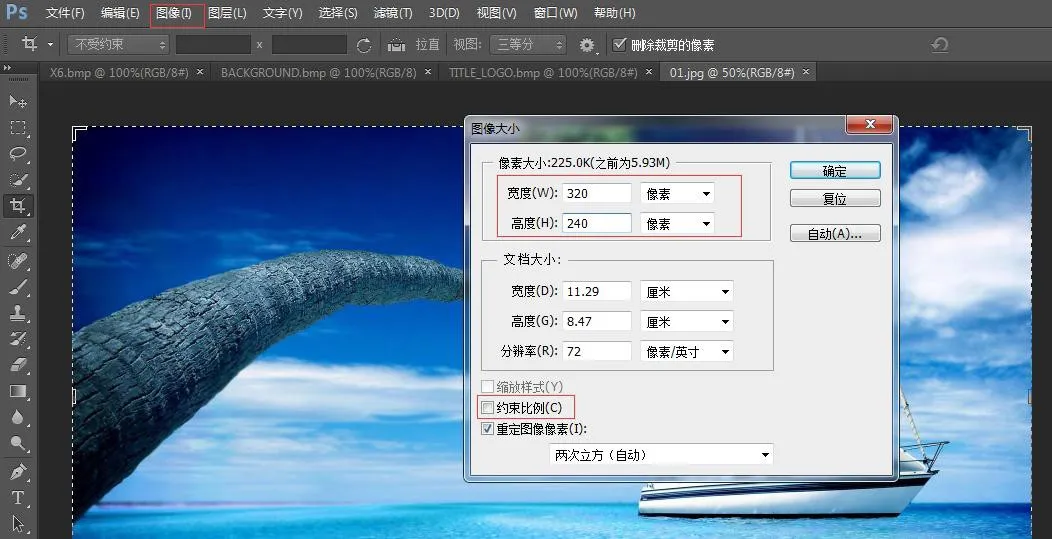 <
Stellen Sie Breite und Höhe basierend auf Ihrem Telefonmodell ein. Deaktivieren Sie "Seitenverhältnis beibehalten" → Klicken Sie auf OK
<
Stellen Sie Breite und Höhe basierend auf Ihrem Telefonmodell ein. Deaktivieren Sie "Seitenverhältnis beibehalten" → Klicken Sie auf OK
Datei → Speichern unter → BMP-Format auswählen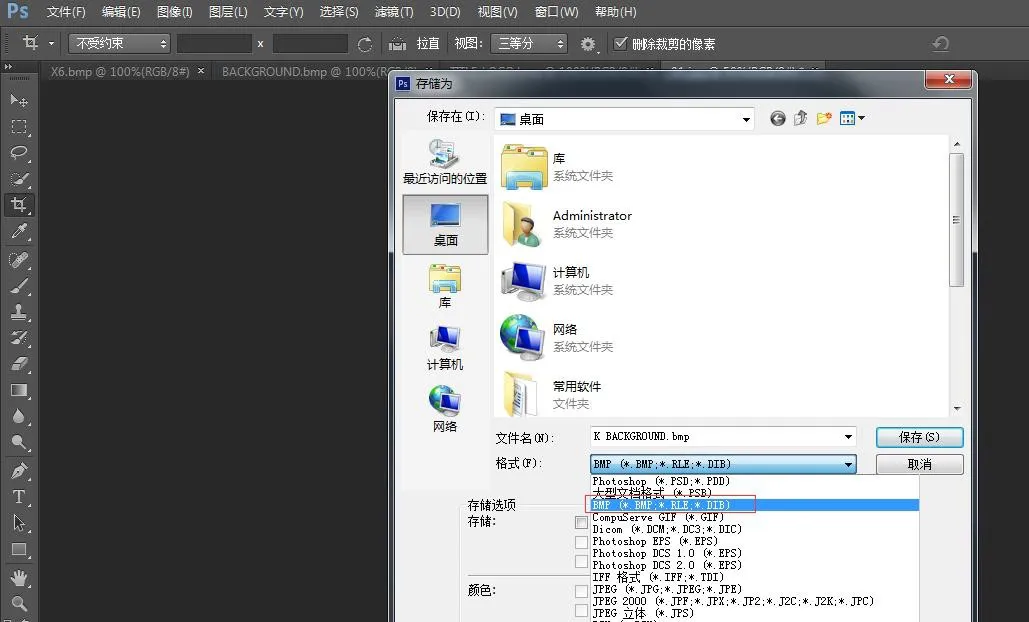
Klicken Sie auf Speichern, wählen Sie die richtige Farbtiefe wie gezeigt: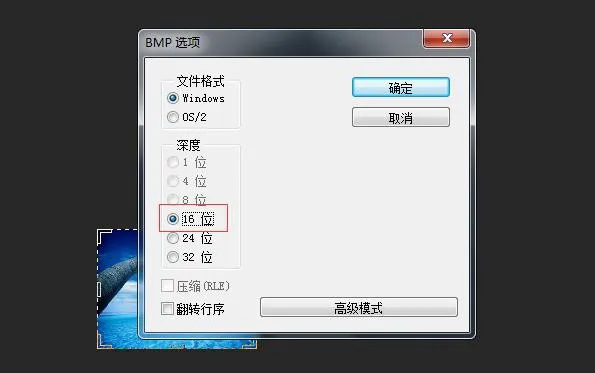 <
Wählen Sie die passende Farbtiefe für Ihr Telefonmodell → OK. Bilderstellung abgeschlossen.
<
Wählen Sie die passende Farbtiefe für Ihr Telefonmodell → OK. Bilderstellung abgeschlossen.
3. Titellogo, Kurzwahl- und DSS-Tastensymbole verwenden die gleiche Erstellungsmethode.
4. So erstellen Sie das etc.tar.gz-Paket
Verwenden Sie das Tool 7-Zip (Beispiel: ICON_SERVICE.bmp)
1) Rechtsklick auf die Datei → 7-Zip → Zum Archiv hinzufügen → Archivformat: tar → OK → etc.tar generieren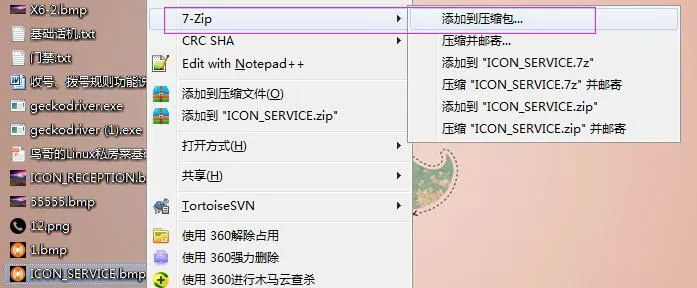
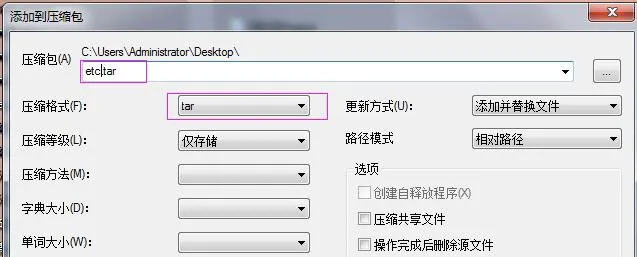
2) Rechtsklick auf etc.tar → 7-Zip → Zum Archiv hinzufügen → Archivformat: gzip → OK → etc.tar.gz generieren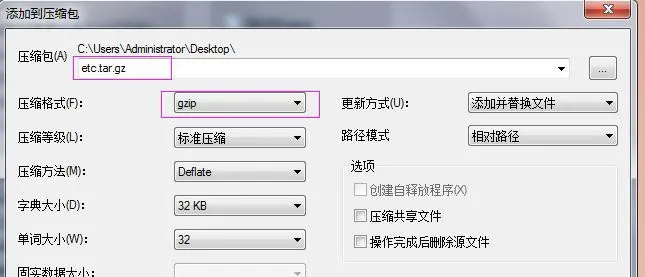
Hintergrundbild-Upgrade für BX3S/BX4/BH5
H5 unterstützt Upgrade von Hintergrundbild, Titellogo und Kurzwahlsymbolen im Leerlauf.
Melden Sie sich an der Weboberfläche des Telefons an → Telefoneinstellungen → Erweitert → Bildschirmbilder. Hier können Sie .bmp- oder etc.tar.gz-Dateien hochladen.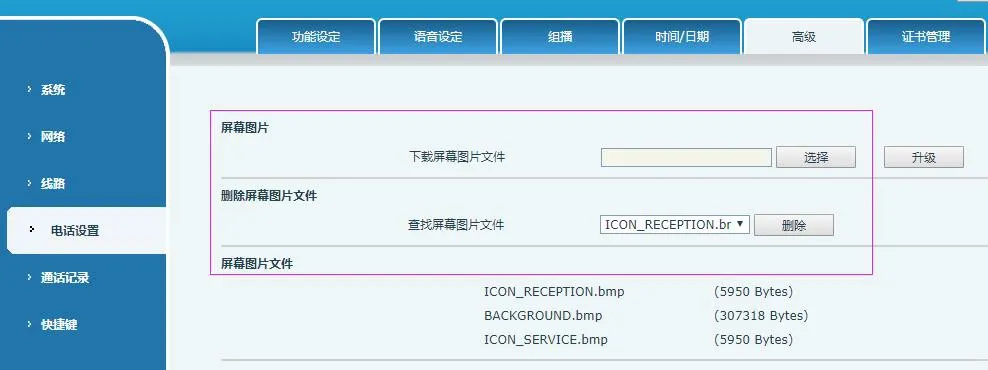 <
Nach erfolgreichem Upgrade können Sie Bilder auf dieser Seite anzeigen und löschen.
<
Nach erfolgreichem Upgrade können Sie Bilder auf dieser Seite anzeigen und löschen.
Hintergrundbild-Upgrade für BX5S/BX6/BX7/BX7C/GP210/GP210i
Melden Sie sich an der Weboberfläche des Telefons an → System → Upgrade → Hintergrundbild-Upgrade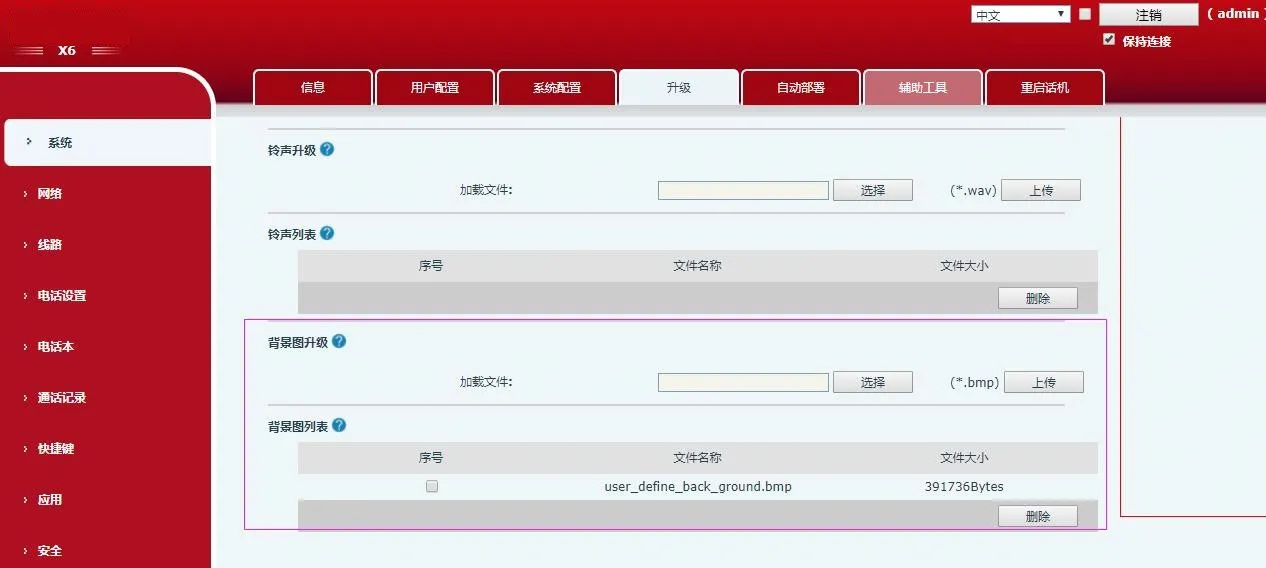 <
Nach erfolgreichem Upgrade können Sie Hintergrundbilder auf dieser Seite anzeigen und löschen.
<
Nach erfolgreichem Upgrade können Sie Hintergrundbilder auf dieser Seite anzeigen und löschen.
DSS-Tastensymbol-Upgrade für BX4U/BX5U/BX6U/BX5S/BX6/BX7/BX7C/GP210/GP210i (2 Methoden)
1) Direktes Upgrade (.png)
Weboberfläche: System → Upgrade → DSS-Tastensymbol-Upgrade. Laden Sie benutzerdefinierte Symbole hoch (müssen den Benennungsregeln in Tabelle 4 folgen). Upgegradete Symbole erscheinen in der Liste der DSS-Tastensymbole.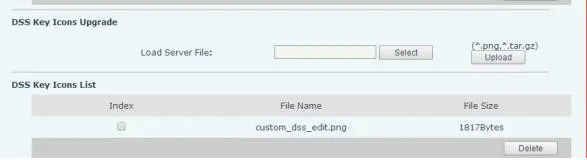
2) Stapel-Upgrade (.tar.gz)
Für die Massenaktualisierung von Symbolen verwenden Sie das .tar.gz-Paket (benutzerdefinierter Name unterstützt).
① Linux-Paketierbefehl: tar –zcvf etc.tar.gz xxx.png xxx1.png
② Windows-Paketierung (7-Zip):
- Wählen Sie Dateien aus → Rechtsklick → 7-Zip → Zum Archiv hinzufügen → tar → OK (etc.tar erstellen)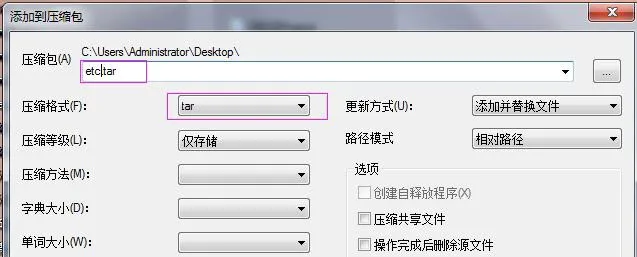 - Rechtsklick auf etc.tar → 7-Zip → Zum Archiv hinzufügen → gzip → OK (etc.tar.gz erstellen)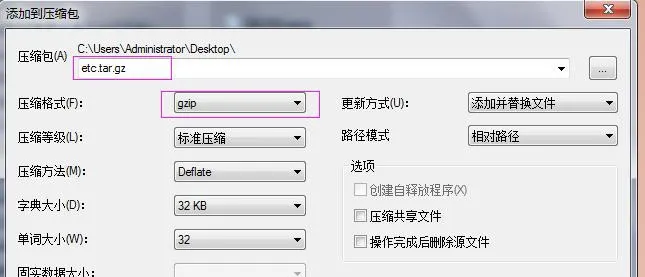
Wählen Sie nach dem Upgrade die benutzerdefinierten DSS-Tastensymbole auf der Weboberfläche aus.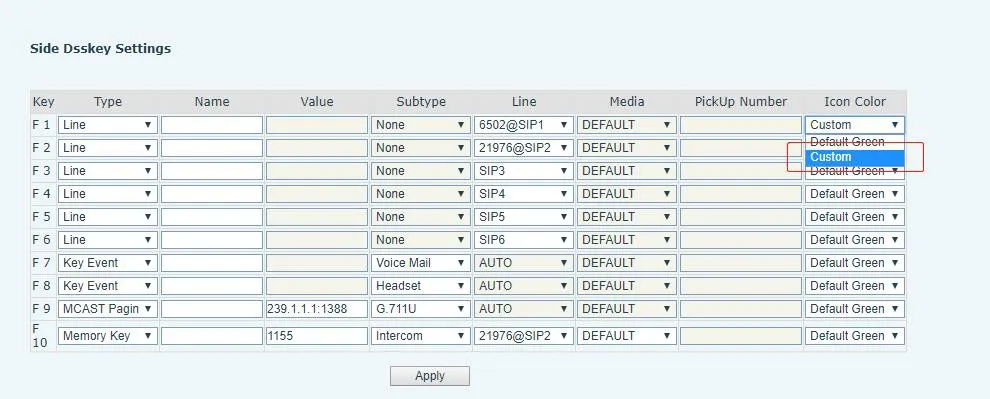
Auto Provision für die BX34-Serie (Hintergrundbild, Titellogo; H5 unterstützt Kurzwahlsymbole)
Fügen Sie Auto Etc Url im Abschnitt
| Auto | Etc | Url | : ftp://1:1@172.16.6.62/BACKGROUND.bmp |
| Auto | Etc | Url | : ftp://1:1@172.16.6.62/TITLE_LOGO.bmp |
| Auto | Etc | Url | |
| : ftp://1:1@172.16.6.62/etc.tar.gz |
Konfigurationsbeispiel (BACKGROUND.bmp):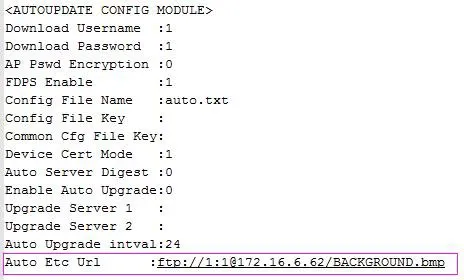
BX4U/BX5U/BX6U/BX5S/BX6/BX7/BX7C/GP210/GP210i verwenden die gleiche Auto Provision-Methode für Hintergrundbilder und DSS-Tastensymbole (keine Unterstützung für Titellogo). Dateinamen sind anpassbar.
Beispiel (BX6):
Auto Etc Url : ftp://1:1@172.16.6.62/X6.bmp
Auto Etc Url : ftp://1:1@172.16.6.62/etc.tar.gz