
Der Farbbildschirm SIP Phone Image Upgrade Guide enthält benutzerdefinierte Hintergrundbilder, Logos, DSS-Tastensymbole, Photoshop-Erstellung, 7-Zip-Verpackung, Web-UI und Auto Provision Upgrade-Schritte für alle Modelle
IP-Telefone mit Farbbildschirm unterstützen die benutzerdefinierte Aktualisierung von Ruhe-Hintergrundbildern und Titellogos. Geräte der H5-Serie ermöglichen zusätzlich eine individuelle Anpassung der Schnelltasten-Icons. Zwei Aktualisierungsverfahren stehen zur Verfügung: Web-UI-Aktualisierung und Auto-Provisioning-Aktualisierung. Unterstützte Bildformate: .bmp und .tar.gz.
1. Spezifikationen der Hintergrundbilder für verschiedene Farbbildschirm-Telefonmodelle:
Tabelle 1 – Spezifikationen Hintergrundbilder Farbbildschirm-Serie
| Modell | Auflösung B*H | Farbtiefe | Format | Dateigröße | Dateiname |
| BX3S/BX4 | 320*240 | 16 Bit RGB565 | bmp | ~150KB | Unbegrenzt |
| BX3SG | 320*240 | 16 Bit RGB565 | bmp | ~150KB | Unbegrenzt |
| BX3U | 320*240 | 16 Bit RGB565 | bmp | ~150KB | Unbegrenzt |
| BX4U | 320*240 | 16 Bit RGB565 | bmp | ~150KB | Unbegrenzt |
| BH5 | 480*320 | 16 Bit RGB565 | bmp | ~300KB | Unbegrenzt |
| BX5S | 480*320 | 16 Bit / 24 Bit RGB565 | bmp | ~300KB | Unbegrenzt |
| BX5U | 480*320 | 16 Bit RGB565 | bmp | ~300KB | Unbegrenzt |
| BX6-Main | 480*272 | 24 Bit RGB888 | bmp | ~380KB | Unbegrenzt |
| BX6-Sub | 240*320 | 16 Bit RGB565 | bmp | ~150KB | Unbegrenzt |
| BX6U | 480 * 272 | 24 Bit RGB888 | bmp | ~380KB | Unbegrenzt |
| BX7 | 800*480 | 24 Bit RGB888 | bmp | ~1,00MB | Unbegrenzt |
| BX7C | 800*480 | 24 Bit RGB888 | bmp | ~1,00MB | Unbegrenzt |
| GP210/GP210i-Main | 480*272 | 24 Bit RGB888 | bmp | ~380KB | Unbegrenzt |
| GP210/GP210i-Sub | 320*480 | 16 Bit RGB565 | bmp | ~300KB | Unbegrenzt |
2. Spezifikationen der DSS-Tasten-Icons für verschiedene Farbbildschirm-Modelle:
Tabelle 2 – Spezifikationen DSS-Tasten-Icons Farbbildschirm
| Modell | Auflösung B*H | Farbtiefe | Format | Dateigröße | Dateiname |
| BX3S/BX4 | - | - | - | - | - |
| BH5 | 54*54 | 16 Bit RGB565 | bmp | ~5KB | Siehe Tabelle 3 |
| BX4U-Side | 25*25 | 32 Bit | Png | ~3KB | Siehe normale DSS-Taste Tabelle 4 |
| BX4U-Sub | 42*42 | 32 Bit | Png | ~3KB | Siehe normale DSS-Taste Tabelle 4 |
| BX5U-Side | 25*25 | 32 Bit | Png | ~3KB | Siehe normale DSS-Taste Tabelle 4 |
| BX5U-Sub | 42*42 | 32 Bit | Png | ~3KB | Siehe normale DSS-Taste Tabelle 4 |
| BX6U-Side | 25*25 | 32 Bit | Png | ~3KB | Siehe normale DSS-Taste Tabelle 4 |
| BX6U-Sub | 42*42 | 32 Bit | Png | ~3KB | Siehe normale DSS-Taste Tabelle 4 |
| BX5S | - | - | - | - | - |
| BX6-Sub DSS | 42*42 | 32 Bit | Png | ~3KB | Siehe normale DSS-Taste Tabelle 4 |
| BX7 | - | - | - | - | - |
| BX7C | 31*31 | 32 Bit | Png | ~4KB | Siehe seitliche DSS-Taste Tabelle 4 |
| GP210/GP210i-Side | 25*25 | 32 Bit | Png | ~2KB | Siehe seitliche DSS-Taste Tabelle 4 |
| GP210/GP210i-Sub DSS | 42*42 | 32 Bit | Png | ~3KB | Siehe normale DSS-Taste Tabelle 4 |
3. Namensgebung der Schnellwahl-Icons für BH5-Telefone im Ruhemodus:
Tabelle 3 – Namensgebung benutzerdefinierter Icons H5-Telefone
| Dateityp | Dateiname | Format | Dateigröße | Auflösung BxH |
| Empfang | ICON_RECEPTION | bmp | ~5KB | 54x54 |
| Service | ICON_SERVICE | bmp | ~5KB | 54x54 |
| Reinigung | ICON_CLEANING | bmp | ~5KB | 54x54 |
| Weckfunktion | ICON_WAKEUP | bmp | ~5KB | 54x54 |
| Notfall | ICON_EMG | bmp | ~5KB | 54x54 |
| Verwaltung | ICON_MANAGER | bmp | ~5KB | 54x54 |
Hinweis: Der Hintergrund von Schnelltasten-Bildern muss schwarz sein, um Hintergrundtransparenz zu erzielen und runde Icons auf dem LCD-Bildschirm anzuzeigen.
4. Namensgebung der DSS-Tasten-Icons für Farbbildschirm-Telefone im Ruhemodus:
Tabelle 4 – DSS- & Seitendss-Tasten-Icons
| DSS-Typ | Icon-Name Seitendss | Icon-Name Normal-DSS |
| BLF-Liste | side_custom_dss_blflist.png | custom_dss_blflist.png |
| DTMF | side_custom_dss_dtmf.png | custom_dss_dtmf.png |
| Keine Funktion | side_custom_dss_edit.png | custom_dss_edit.png |
| Tastenereignis | side_custom_dss_keyevent.png | custom_dss_keyevent.png |
| Leitung | side_custom_dss_line.png | custom_dss_line.png |
| URL & Aktions-URL | side_custom_dss_url.png | custom_dss_url.png |
| Multicast | side_custom_dss_mcast.png | custom_dss_mcast.png |
| Speichertaste / Beratungsübergabe | side_custom_dss_mem_axfer.png | custom_dss_mem_axfer.png |
| Speichertaste / Blindübergabe | side_custom_dss_mem_bxfer.png | custom_dss_mem_bxfer.png |
| Speichertaste / Anrufparkung | side_custom_dss_mem_callpark.png | custom_dss_mem_callpark.png |
| Speichertaste / Anrufweiterleitung | side_custom_dss_mem_cfw.png | custom_dss_mem_cfw.png |
| Speichertaste / Konferenz | side_custom_dss_mem_conf.png | custom_dss_mem_conf.png |
| Speichertaste / DTMF | side_custom_dss_mem_dtmf.png | custom_dss_mem_dtmf.png |
| Speichertaste / Gegensprechen | side_custom_dss_mem_intercome.png | custom_dss_mem_intercome.png |
| Speichertaste / Nachrichtenanzeige | side_custom_dss_mem_mwi.png | custom_dss_mem_mwi.png |
| Speichertaste / Neuer Anruf | side_custom_dss_mem_newcall.png | custom_dss_mem_newcall.png |
| Speichertaste / Präsenz | side_custom_dss_mem_present.png | custom_dss_mem_present.png |
| Speichertaste / Schnellwahl | side_custom_dss_mem_spdial.png | custom_dss_mem_spdial.png |
Spezifikationen Titellogo für Farbbildschirm-Telefone:
Hinweis: Die Serien X5S & X6 unterstützen vorübergehend keine benutzerdefinierte Aktualisierung des Titellogos.
| Modell | Auflösung BxH | Farbtiefe | Format | Dateigröße | Dateiname |
| X3S/X4/H5/D5 | B ≤ Bildschirmbreite; H < Titelleistenhöhe | 16 Bit RGB565 | bmp | ~10KB | TITLE_LOGO |
Titelleistenhöhe (titlebarH):
A: H5 = 40px
B: BX3S/BX4/D5 = 35px
Adobe Photoshop
2.1 Photoshop öffnen → Bild öffnen → Bild → Bildgröße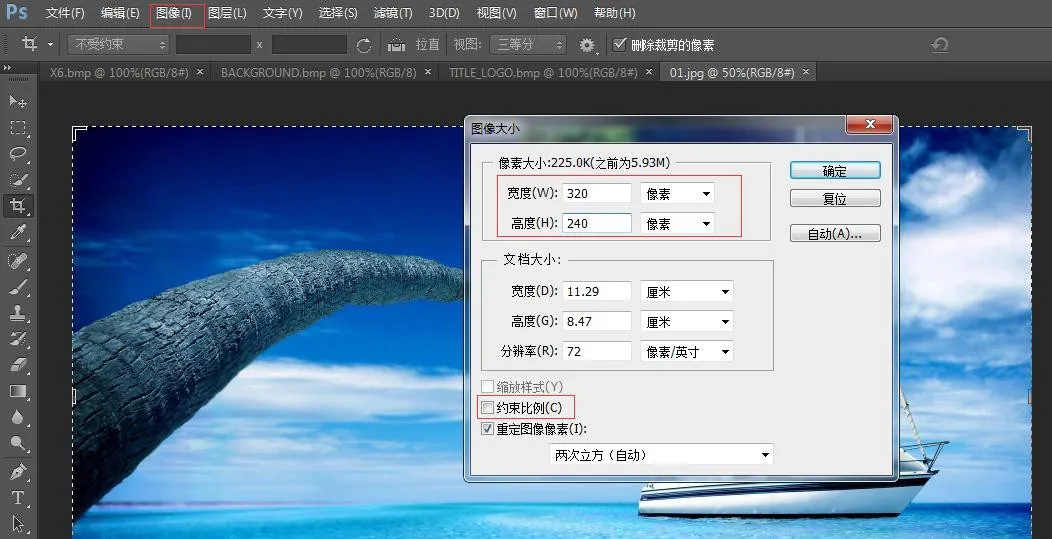 <
Breite und Höhe entsprechend dem Telefonmodell einstellen. Proportionen beibehalten deaktivieren → OK klicken
<
Breite und Höhe entsprechend dem Telefonmodell einstellen. Proportionen beibehalten deaktivieren → OK klicken
2.2 Datei → Speichern unter → BMP-Format wählen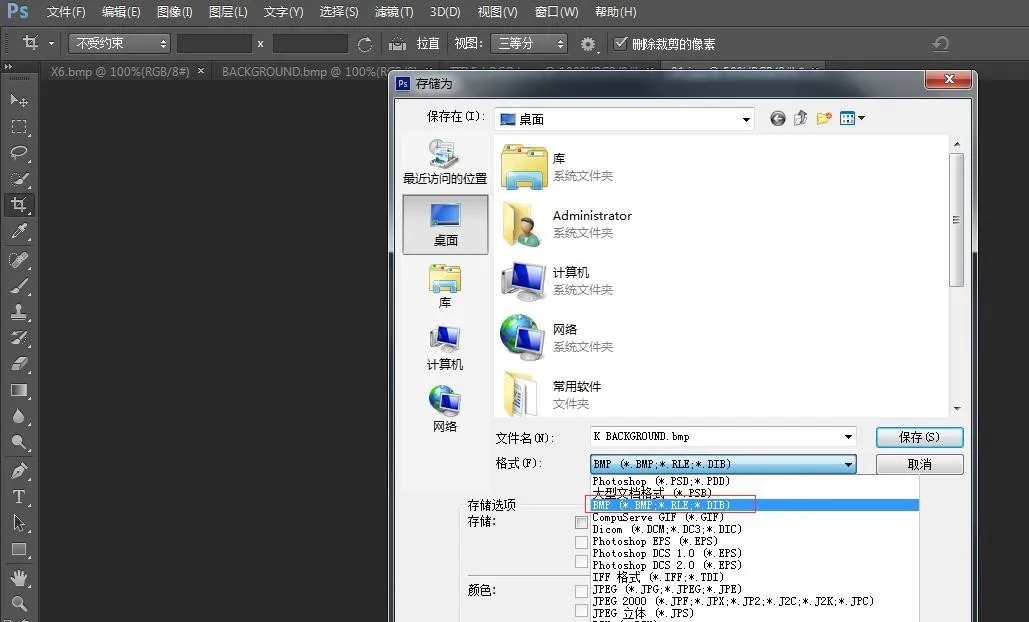
2.3 Speichern klicken und passende Farbtiefe auswählen: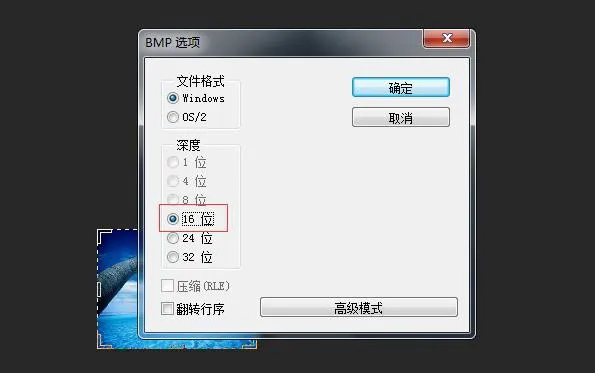 <
Die zum Telefon passende Farbtiefe auswählen → OK. Bilderstellung abgeschlossen.
<
Die zum Telefon passende Farbtiefe auswählen → OK. Bilderstellung abgeschlossen.
3. Titellogo, Schnellwahl- und DSS-Tasten-Icons werden nach dem gleichen Verfahren erstellt.
4. Erstellen eines etc.tar.gz-Pakets
Verwenden Sie das Tool 7-Zip (Beispiel: ICON_SERVICE.bmp)
1) Rechtsklick auf die Datei → 7-Zip → Zum Archiv hinzufügen → Archivformat: tar → OK → etc.tar erstellen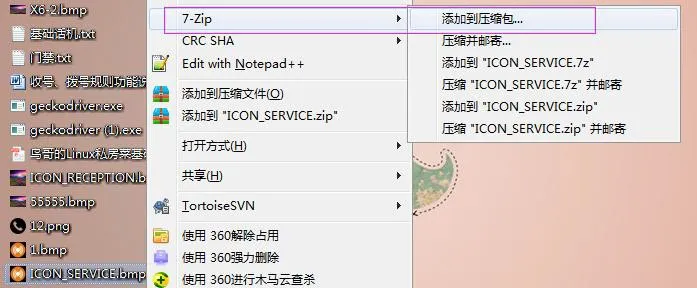
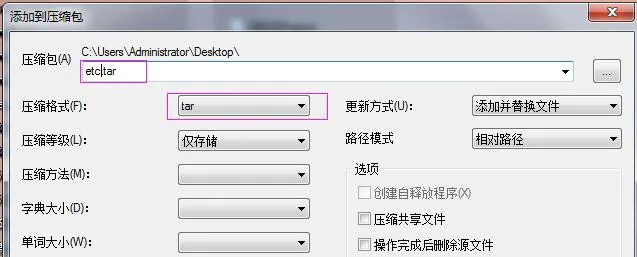
2) Rechtsklick auf etc.tar → 7-Zip → Zum Archiv hinzufügen → Archivformat: gzip → OK → etc.tar.gz erstellen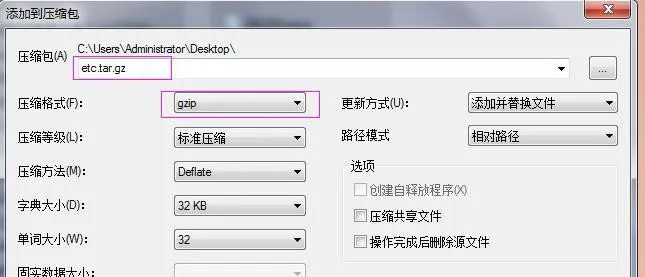
Hintergrundaktualisierung BX3S/BX4/BH5
Die H5-Serie unterstützt die Aktualisierung von Hintergrundbildern, Titellogos und Schnellwahl-Icons im Ruhemodus.
Anmelden in der Telefon-Web-Oberfläche → Telefoneinstellungen → Erweitert → Bildschirmbilder. Laden Sie hier .bmp- oder etc.tar.gz-Dateien hoch.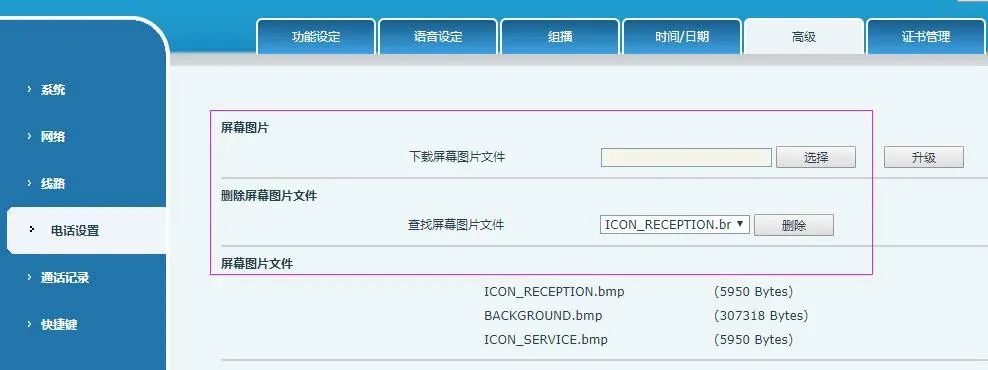 <
Nach erfolgreicher Aktualisierung können Bilder auf dieser Seite angezeigt und gelöscht werden.
<
Nach erfolgreicher Aktualisierung können Bilder auf dieser Seite angezeigt und gelöscht werden.
Hintergrundaktualisierung BX5S/BX6/BX7/BX7C/GP210/GP210i
Anmelden in der Telefon-Web-Oberfläche → System → Aktualisierung → Hintergrundupdate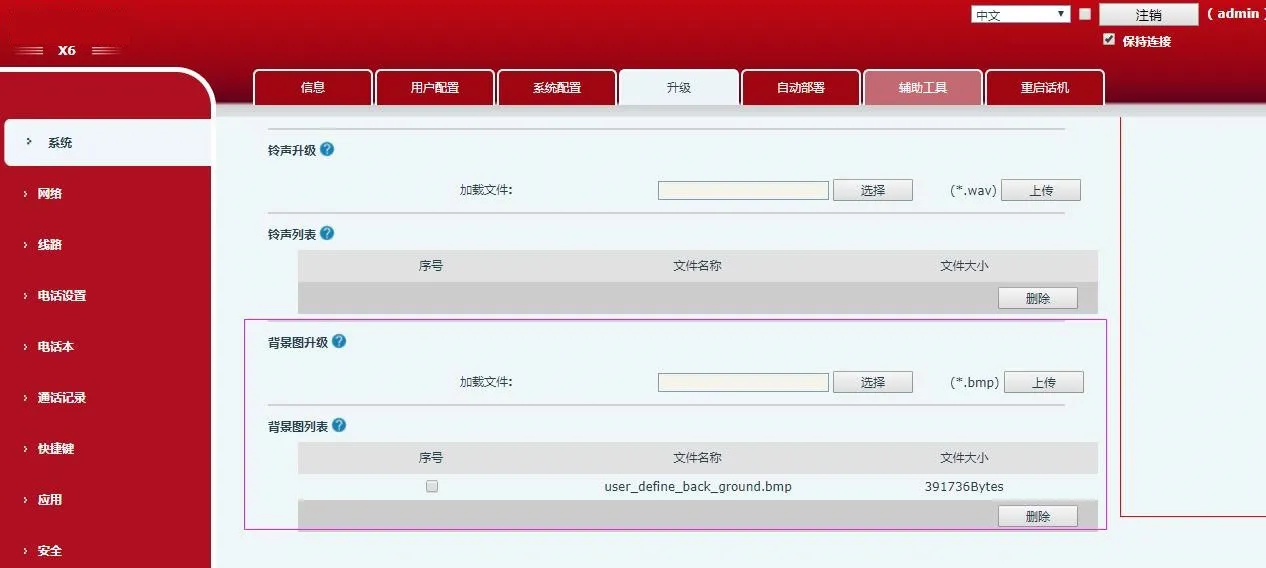 <
Nach erfolgreicher Aktualisierung können Hintergrundbilder auf dieser Seite angezeigt und gelöscht werden.
<
Nach erfolgreicher Aktualisierung können Hintergrundbilder auf dieser Seite angezeigt und gelöscht werden.
DSS-Tasten-Icon-Aktualisierung (2 Methoden) BX4U/BX5U/BX6U/BX5S/BX6/BX7/BX7C/GP210/GP210i
1) Direktupdate (.png)
Web-Oberfläche: System → Aktualisierung → DSS-Icon-Update. Laden Sie benutzerdefinierte Icons gemäß den Namensregeln aus Tabelle 4 hoch. Aktualisierte Icons erscheinen in der DSS-Tasten-Icons-Liste.
2) Massenupdate (.tar.gz)
Für die gleichzeitige Aktualisierung mehrerer Icons verwenden Sie ein .tar.gz-Paket (benutzerdefinierte Dateinamen zulässig).
① Linux-Packbefehl: tar –zcvf etc.tar.gz xxx.png xxx1.png
② Windows-Packvorgang (7-Zip):
- Dateien auswählen → Rechtsklick → 7-Zip → Zum Archiv hinzufügen → tar → OK (etc.tar erstellen)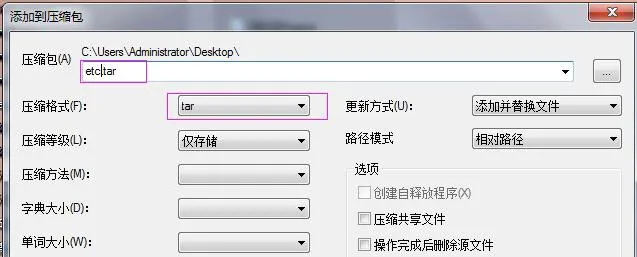 - Rechtsklick auf etc.tar → 7-Zip → Zum Archiv hinzufügen → gzip → OK (etc.tar.gz erstellen)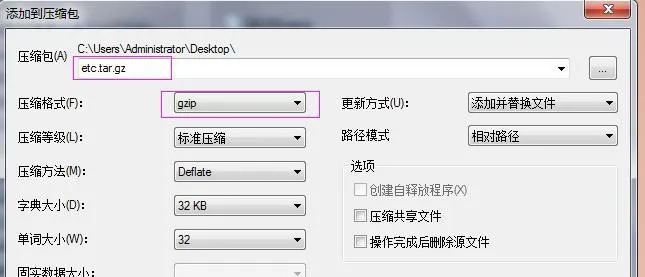
Nach Abschluss des Updates wählen Sie benutzerdefinierte DSS-Tasten-Icons in der Web-Oberfläche aus.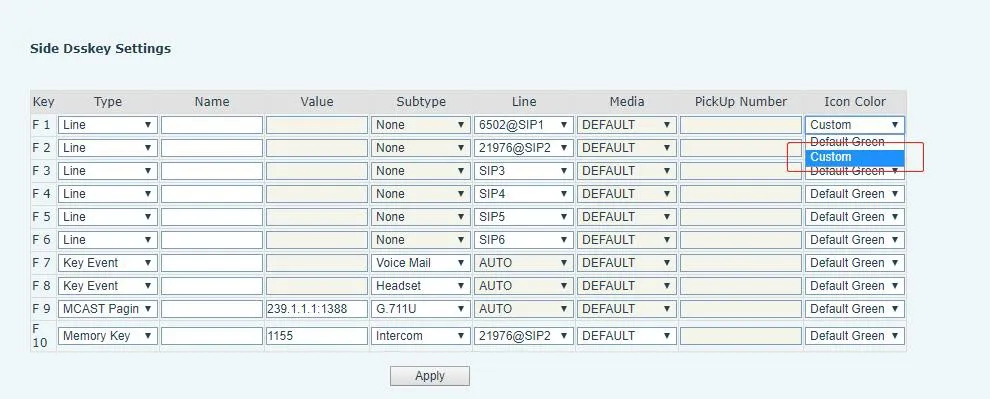
Auto-Provisioning BX34-Serie (Hintergrund, Titellogo; H5 unterstützt Schnellwahl-Icons)
Fügen Sie im Abschnitt
| Auto | Etc | Url | : ftp://1:1@172.16.6.62/BACKGROUND.bmp |
| Auto | Etc | Url | : ftp://1:1@172.16.6.62/TITLE_LOGO.bmp |
| Auto | Etc | Url | : ftp://1:1@172.16.6.62/etc.tar.gz |
Konfigurationsbeispiel (BACKGROUND.bmp):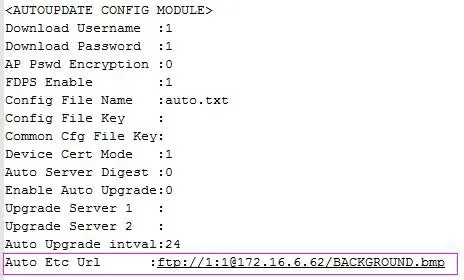
Die Modelle BX4U/BX5U/BX6U/BX5S/BX6/BX7/BX7C/GP210/GP210i verwenden das gleiche Auto-Provisioning-Verfahren für Hintergrundbilder und DSS-Icons (keine Unterstützung für Titellogos). Dateinamen sind frei anpassbar.
Beispiel (BX6):
Auto Etc Url : ftp://1:1@172.16.6.62/X6.bmp
Auto Etc Url : ftp://1:1@172.16.6.62/etc.tar.gz